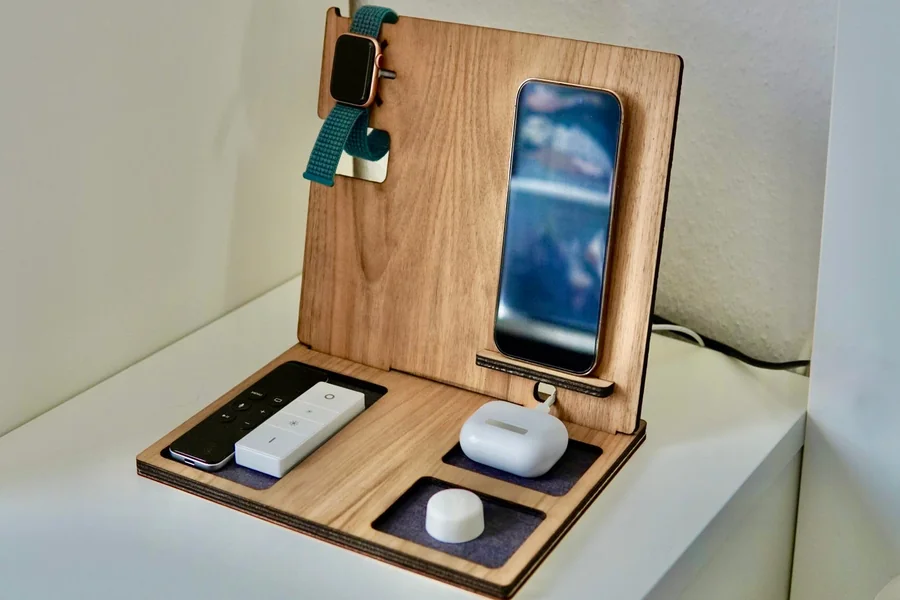
Modern households often have several devices that need charging every day, including iPhones, iPads, wireless earbuds, watches, and laptops. Keeping track of individual cables and adapters can quickly make a desk or bedside table feel cluttered. An Apple charging station can bring compatible devices together in one organised area, making it easier to manage charging without spreading accessories throughout the room.
The right setup depends on how many devices you own, how much power they need, and whether you want to charge them at home, at work, or while travelling. A little planning can improve convenience while helping you avoid unnecessary cables and incompatible accessories.
Why Use a Dedicated Charging Station?
A charging station provides a central location for powering several devices. Instead of searching for a spare wall adapter or moving cables between rooms, users can return their devices to the same place whenever charging is needed.
This can be particularly useful for families or people who use Apple products across work and personal routines. A station with multiple charging points may support several devices at once, although the available output and charging speed depend on its design.
Reduce Cable Clutter
A desk can become untidy when every device has its own cable and wall adapter. A charging station can consolidate compatible charging connections and reduce the number of adapters occupying nearby sockets.
Some designs use raised stands or angled charging surfaces, keeping phones visible while they charge. Others focus on compact storage, making them suitable for nightstands and smaller workspaces.
Before buying, measure the area where you plan to place the station. Ensure that there is enough room for connected devices, cables, and ventilation.
Keep Devices Easy to Find
A dedicated charging location also helps create a simple household routine. Phones, earbuds, and other small devices can be returned to the same place rather than left in different rooms.
This is useful for people who rely on their devices for alarms, calendars, work messages, or navigation. A well-organised charging area can make it easier to check battery levels before leaving home.
How to Choose an Apple Charging Station
Charging stations differ in their supported devices, number of ports, wireless charging capabilities, and total power output. A product that suits one person’s desk may not be appropriate for a household with multiple laptops and tablets.
Consider these features before choosing a model.
Device compatibility: Confirm that the station supports your specific devices. Apple Watch charging requirements, iPhone wireless charging standards, and laptop power needs can differ.
Number of charging points: Count the devices you expect to charge simultaneously. Extra ports are useful only if the station can provide suitable power to connected devices.
Total output: A station’s total wattage may be shared across multiple ports. Review both single-port and multi-port specifications.
Wireless and wired options: Wireless charging can reduce cable clutter for compatible devices, while USB-C ports are useful for tablets, laptops, and other accessories.
Desk footprint: A compact design may be better for a bedside table, while a larger station can suit a shared family charging area.
Safety features: Look for appropriate electrical protections and follow the manufacturer’s instructions for placement and use.
Checking these details can help you avoid a station that has many ports but cannot charge your main devices at the speeds you expect.
When a Power Bank Is the Better Choice
A stationary charging setup is useful at home, but it cannot help much when you spend the day away from an outlet. In that situation, a power bank can provide portable power for compatible phones, tablets, and other USB-powered devices.
Power banks are available in different sizes and capacities. A compact model may be enough for occasional phone top-ups, while a higher-capacity option with greater output may suit people who also need to charge tablets or laptops.
Capacity and Output Are Different
Battery capacity is often expressed in milliampere-hours (mAh), but capacity alone does not indicate how quickly a power bank can charge a device. Output power, supported charging protocols, cable quality, and the device’s own charging limits also influence performance.
For example, a power bank with a USB-C port may support fast charging for one device but offer a lower output when several devices are connected. Always check the product specifications rather than assuming every port has the same capabilities.
Features Worth Comparing
When choosing a power bank, look at its capacity, output, dimensions, weight, and available connections. Built-in cables can reduce the number of accessories you need to carry, while multiple ports may allow you to charge more than one device.
A display or battery indicator can also help you estimate how much power remains. If you plan to travel by air, review the relevant airline and airport requirements for portable batteries before departure.
Combining a Home Station with Portable Charging
A home charging station and a power bank solve different problems. One keeps everyday charging organised in a fixed location; the other provides flexibility away from an outlet.
A practical setup might include a multi-device station on a desk or bedside table and a smaller power bank in a backpack. Charge the power bank before leaving home, and return it to the charging area when you get back.
If you use a laptop, tablet, and phone together, check whether your station can supply enough power for all of them simultaneously. Some stations prioritise certain ports or reduce individual output when multiple devices are connected.
It is also useful to label or organise cables if different devices require different connectors. This makes it easier for family members or colleagues to use the setup without repeatedly unplugging one another’s devices.
Everyday Charging Habits That Help
Good charging habits make accessories easier to use and can reduce avoidable wear.
- Place charging equipment on a stable, dry surface.
- Keep cables away from areas where they may be pinched or bent sharply.
- Avoid covering chargers and devices with materials that trap heat.
- Use cables and adapters that meet the device manufacturer’s requirements.
- Inspect connectors for damage and replace worn accessories.
- Disconnect equipment if you notice unusual heat, damage, or a burning smell.
- Keep portable batteries away from extreme temperatures.
Wireless charging can generate heat, and wired charging can also warm a device under certain conditions. Follow the instructions for the specific charger and phone, and avoid placing charging equipment in enclosed spaces without suitable airflow.
Common Mistakes When Buying Charging Accessories
One common mistake is choosing a station based only on the number of ports. More connections do not necessarily mean more available power, so check how output is distributed across ports.
Another mistake is assuming that a single charging station will support every Apple device. Some products may charge an iPhone and earbuds wirelessly but require a separate compatible charger for an Apple Watch or laptop.
For portable power, capacity should be considered alongside size and output. A large power bank may provide more energy, but it can be inconvenient to carry every day. Choose according to your typical usage rather than an occasional worst-case scenario.
Build a Charging Setup That Fits Your Routine
A well-planned charging area can reduce clutter and make it easier to keep everyday devices ready for use. An Apple charging station is a useful option for home or office charging, while a power bank helps when you need energy away from a wall outlet.
Before purchasing, list the devices you want to charge, determine which need wired or wireless connections, and check the station’s total output. Then choose a portable battery if your routine also includes long commutes, travel, or time away from a desk.
Would a central charging station simplify your home setup, or do you need portable power just as often?
Frequently Asked Questions
What should an Apple charging station support?
It should support the devices you intend to charge, including their required charging standards and power levels. Check compatibility with your iPhone, iPad, Apple Watch, earbuds, and laptop individually.
Can one charging station charge several devices at once?
Many stations support multiple devices, but their total output is shared according to the design. Review the multi-port specifications to understand how charging performance may change when several devices are connected.
Is a power bank useful if I already have a charging station?
Yes. A charging station is designed for a fixed location, while a power bank supplies portable power when a wall outlet is unavailable.
How do I keep my charging station organised?
Choose a suitable location, route cables neatly, remove accessories you no longer use, and keep each device’s required cable accessible. Ensure that the station has sufficient ventilation and a stable surface.

James is the creative mind behind worthelevate.com, with 4 years of experience writing hilarious puns, including food puns and animal puns. His witty articles add humor to everyday topics, making him a go-to for those seeking a fun twist on their favorite meals and animals.